

wp-login.php is one of the best-known files in WordPress. It is normally used to log in to the administration, so it has long been a popular target for brute force attacks. Let us look at data from WEDOS Global Protection logs.
For this article, we selected only blocked requests where the URL contained wp-login.php, and only from domains protected by WEDOS Global Protection. The data covers 24 hours – Monday, 04.05.2026.
Some of you may be surprised, but attackers often do not care if WordPress really runs on the target domain. They simply try it. And if it does not work in the main directory, they try another path. And then another. And another.
In 24 hours, in blocked traffic only, we saw:
- 133 523 hosts*
- 51 active PoP locations that handled the traffic
- 9 923 unique IP addresses
- 4 362 672 blocked requests
* this does not have to be a real domain or subdomain; attackers like to try random subdomains
And this is only the traffic that was blocked. Many customers also have wp-login.php protection disabled or limited, or they have attacking IP addresses on a whitelist. These requests are not included in the statistics. If we blocked everything, there would be about another 500 thousand requests.
One day of blocked traffic to wp-login.php
The first chart shows the number of blocked requests in 30-minute intervals.
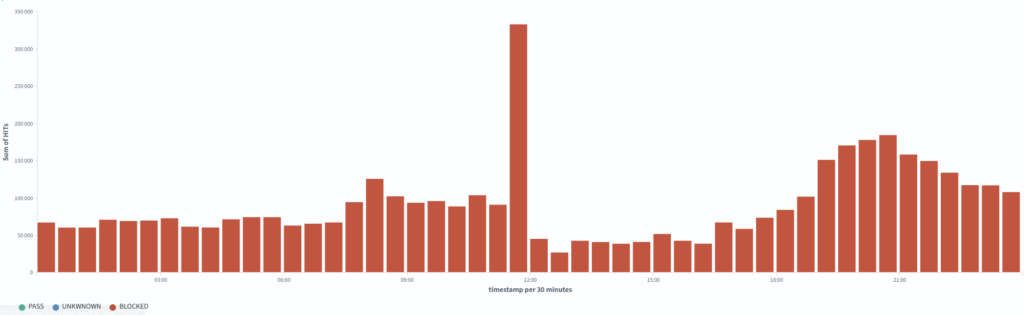
wp-login.php over 24 hours. The chart shows the number of blocked requests in 30-minute intervals across websites protected by WEDOS Global Protection.At first sight, there is one clear peak around noon. This was a large increase in blocked traffic. On the general chart, it looks like one dominant brute force attack.
But when we look at the data in more detail, we can see that it is not just one simple type of attack.
This is important with data like this. When you look only at an aggregated chart, it is easy to think that you only need to find one problem and write one rule. But in real traffic, many things are usually mixed together.
Some traffic is pure brute force. Some traffic is scanning. Some traffic is looking for WordPress. Some requests try to hit a non-standard path. Some traffic has already hit a rate limit. And some traffic is generally suspicious behavior that does not make sense to solve only by one URL.
WEDOS Global Protection contains more than 100 rules. Dozens of them are dynamic and adapt to current traffic and attacker behavior. There are also different rate limits that watch the behavior of a specific IP address, traffic to a specific domain, JA4/JA4H fingerprints, and other signals. As a result, a robot looking for vulnerabilities may make a few attempts on a few websites, but it will not get to thousands of others.
It was not only brute force
The second chart shows the breakdown by blocking reason.
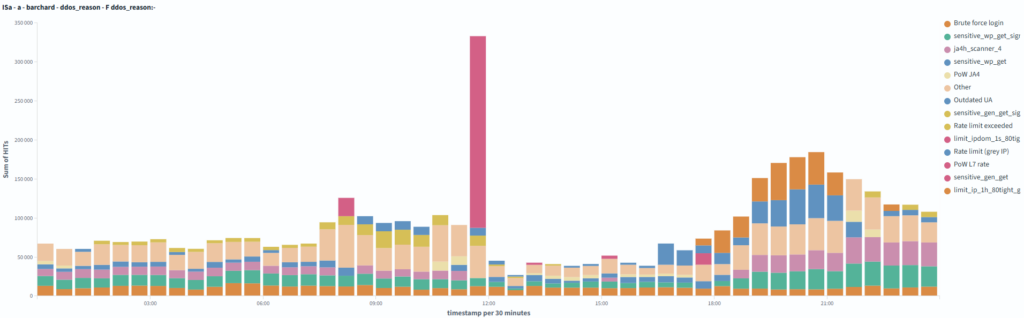
For the whole day, the largest blocking reasons looked like this:
| Blocking reason | Requests |
|---|---|
| Attack signature detected on a sensitive WordPress file | 669 103 |
| Brute force attack | 538 644 |
| Known vulnerability scanner by JA4 signature | 514 441 |
| Rate limit (IP on greylist) | 333 045 |
| Hourly limit reached for greylisted IPs over port 80 | 262 403 |
| High rate limit, PoW challenge sent | 248 405 |
| Suspicious GET request to a sensitive WP file | 201 714 |
| Rate limit exceeded | 117 753 |
| Suspicious JA4 signature, PoW challenge sent | 83 085 |
| Suspicious signal in GET request to a sensitive WP file | 76 895 |
| Limit exceeded for IP in a 1-second interval (IP on stricter greylist) | 38 118 |
| Unused User-Agent | 31 155 |
| Suspicious signature in GET request (generic web) | 4 073 |
| More than one hundred other rules and rate limits | 1 243 838 |
Here we can clearly see why this traffic cannot be seen only as an “attack on WordPress login”.
Yes, part of the traffic is brute force attempts. But a large part is something else, especially when there is no WordPress on the website. You cannot simply tolerate this and let it overload servers for no reason. We check everything and mainly look for vulnerability scanners and suspicious GET requests.
But back to WordPress. In practice, one attack scenario can look like this:
- The bot tries to find
wp-login.php. - It tries several paths.
- If something responds, it starts sending more requests.
- If it finds a login form, it may switch to POST.
- With higher activity, it hits a rate limit.
- Based on client behavior, TLS fingerprint, HTTP fingerprint, or other signs, it can also fall under other rules. Often, it may not even reach
wp-login.php.
So on the chart, we do not see one attack. We see a mix of automated traffic that is caught by different parts of protection in different phases.
Rate limits are often used for brute force attacks. But why let the attacker make several useless attempts that load the server, when we can detect the attacker earlier by an unused User-Agent, JA4/JA4H fingerprint, or another suspicious signal?
GET searches, POST tries
The split by HTTP method is also interesting.
| Method | Requests | Unique IPs |
|---|---|---|
| GET | 2 785 506 | 6 397 |
| POST | 1 535 106 | 5 469 |
| HEAD | 111 | 68 |
There were much more GET requests than POST requests during the day.
This matches how similar automated attacks usually work. GET is often the search phase. The bot checks if the path exists, if the server responds, if it returns something interesting, and if it makes sense to continue.
POST is more interesting. For wp-login.php, it usually means that someone is trying to send something to the login form. For example, a username and password combination. But it can also be something else.
There were very few HEAD requests. In this data, they do not play any real role.
It is good to remember one thing here. When someone sees millions of requests to wp-login.php, it does not automatically mean millions of password attempts. Part of the traffic is searching. Part of it is checking. Part of it is scanners. And only part of it is real login attempts.
Even so, it is still a problem. Because even searching loads the infrastructure. The request must arrive, it must be processed, a decision must be made, and ideally it must not reach the customer backend.
Attackers do not look only for /wp-login.php
As expected, most requests went to the classic path (2 432 655 requests):
/wp-login.phpBut that is not all. The data also contained many other paths:
/wp-includes/images/wp-login.php
/wp-admin/css/wp-login.php
/wp-includes/css/dist/preferences/wp-login.php
/wp-admin/wp-login.php
/wp-admin/js/wp-login.php
/.well-known/acme-challenge/wp-login.php
/wp-content/plugins/classic-editor/wp-login.php
/wp-includes/Requests/library/wp-login.php
/wp-includes/js/imgareaselect/wp-login.php
/wp-includes/l10n/wp-login.php
/wp-includes/html-api/wp-login.php
/wp-admin/css/colors/ocean/wp-login.php
/wp-content/themes/bltm/wp-login.php
/wp-includes/certificates/wp-login.php
/wp-includes/js/tinymce/skins/lightgray/img/wp-login.php
/wp-includes/images/media/wp-login.php
/js/wp-login.php
/wp-content/plugins/wp-login.php
/wp-admin/css/colors/midnight/wp-login.php
This may be the most interesting part of the whole thing.
If this were only an attempt to log in to WordPress, we would expect mainly /wp-login.php. But here we also see paths that do not make sense at first sight.
Why would someone look for wp-login.php here, for example?
/wp-admin/css/wp-login.phpOr here?
/.well-known/acme-challenge/wp-login.phpOne likely explanation is that in these cases attackers are not looking for the real WordPress login form. They are looking for a file named wp-login.php that may actually be a backdoor.
wp-login.php is the known name of a legitimate WordPress file. That is why it can also be useful for attackers. If they manage to compromise WordPress, they can upload their own file with the same name, or with a name that looks similarly trusted. Not into the main directory, where it would be more visible, but deeper in the website structure. For example, between images, CSS files, plugins, or other WordPress files.
From the view of a normal website administrator, this may look less suspicious at first sight. And for some security rules, the name wp-login.php can also be difficult, because it is a normal WordPress file. Some protection systems may therefore be more careful with similar requests, so they do not break legitimate login to the administration.
Attackers know this.
Today, WordPress is not attacked manually by one person at large scale. Automated scripts do it. They look for known vulnerabilities, try weak passwords, test plugins, old installations, wrong permissions, and known paths. When an attack is successful, malware often creates persistence. This means a way to get back into the website again, even after the original vulnerability is partly removed. Typically, this is done through a backdoor.
And here comes another interesting thing. These backdoors are not searched only by the original attacker. Other bots also look for them. If there is already a compromised WordPress website with a backdoor somewhere on the internet, another attacker may try to find it and take it over.
In other words: one attacker compromises the website, and another attacker tries to use the backdoor.
From the attacker’s point of view, it makes sense. A request is cheap. If they send millions of them, even a very small success rate is enough.
From the protection point of view, this is exactly the type of traffic we do not want to let through. The customer backend should not have to handle someone trying to find a file named wp-login.php in an images directory, CSS directory, plugins directory, or ACME challenge path.
Part of the traffic is concentrated, but it is still spread out
We also looked at the ASN networks where the blocked traffic came from.
The largest sources by number of requests:
| ASN | Requests | Unique IPs |
|---|---|---|
| AS31898 | 817 010 | 118 |
| AS8075 | 432 664 | 151 |
| AS41564 | 323 397 | 39 |
| AS215930 | 295 653 | 13 |
| AS206092 | 293 033 | 952 |
| AS42708 | 172 741 | 66 |
| AS14061 | 143 525 | 601 |
| AS396356 | 123 007 | 395 |
| unknown | 118 301 | 1 516 |
| AS154247 | 76 775 | 11 |
Part of the traffic was strongly concentrated. Some ASNs sent hundreds of thousands of requests in one day. At the same time, the whole traffic came from 9 923 unique IP addresses.
Blocking a whole ASN can help in some cases. But in shared infrastructure, it is a step that can have side effects. One ASN can contain attack traffic, but also legitimate users, company networks, VPNs, cloud services, monitoring, or different automated systems.
That is why it is better to work with several signals at the same time. Not only where the request came from, but also what exactly it wants, how often it wants it, how it behaves, what fingerprint it has, what User-Agent it has, if it repeats the same patterns, if it tries to access sensitive paths, and if it showed suspicious behavior before.
For example, even a very problematic IP address can be allowed to access the website if it passes a Proof of Work challenge.
However, if you have at least the Expert plan in WEDOS Global Protection, you have access to many tools, such as Combo rules. With them, you can very easily control traffic using complex conditions. This can be a whitelist, a blacklist, or, for example, a Proof of Work challenge.
Normal internet noise that is no longer normal at this scale
These 4.3 million blocked requests were not some special incident that would mean a major problem by itself. It is more an example of what normal automated internet traffic looks like today.
In fact, it was quite a calm Monday. In one day, we can also see 10 times more traffic if a WordPress vulnerability appears or if there is a large data leak.
Still, even when nothing special is happening, bots look for WordPress every day, literally every second. They look for administrations. They look for old installations. They look for forgotten files. They look for anything that might respond.
And they do not care if WordPress really runs on the domain. They simply send the traffic. And if you do not study server logs, you may not even know about it. Your website is just slower, and you do not know why.
The goal of WEDOS Global Protection is to stop this traffic before it reaches your server. It should not overload your webhosting, VPS, dedicated server, or application. A legitimate user should get where they need to go, while automated junk should be stopped as soon as possible at the edge of the network.